What's Wrong with Apple?
Table of Contents
“iPhones are easier to use, I could never use an Android” — a phrase I’ve heard to the point of nausea, yet so widespread that it convinced me it was actually true. A few days ago, I became the proud owner of an iPhone 12 Pro. It was a moment of jubilation destined to last only a short while — just enough time to begin the troubled migration from my dear old Samsung S10.
iOS WTF #
While for some operations everything was simple and immediate — for example, importing calendars and contacts from Nextcloud took just a few seconds with full integration into the system apps — other aspects were a truly unexpected nightmare. Specifically:
WhatsApp #
Despite being an avid Telegram user in every aspect of my communications, nearly 10 years of WhatsApp history still represent a precious memory that I’d obviously like to keep. In my mind, this kind of migration should be made simple by WhatsApp itself, since it belongs to neither Google nor Apple, and yet…
For some time now, the backups that WhatsApp performs on iOS and Android have been incompatible with each other — they appear to be encrypted differently as well, making any kind of portability impossible (to be fair, Samsung has apparently developed their own app to move chats from iOS to Android, but not the other way around).
I spent several hours browsing dubious websites and watching Indian tutorials, but no solution seemed to work. So in the end I decided to pay for a third-party app to perform the transfer — specifically, €25 for a 1-year license of Dr. Fone. A total ripoff, but for that I thank Mother Apple.
Photos #
This was perhaps the most shocking experience. The goal was simple: take photos from Android, move them to the PC, then load them onto iOS. The first two steps are simple and trivial — Android is seen as a storage device by Windows; you go in, copy, and paste. But then…
Naturally, iPhone connects to a Windows PC only via iTunes. From there, still following Indian tutorials but also the clear interface instructions, you point to the source folder with the photos, which will then be synced to the phone.
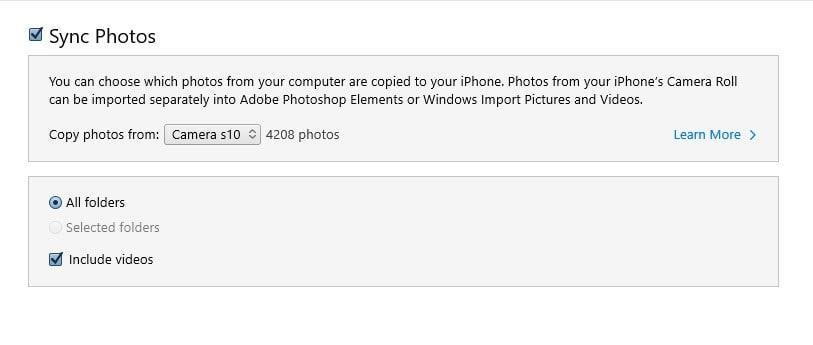
Simple, right? Except it doesn’t work. It literally does nothing, and gathering information around, it seems it has never worked — at least on Windows.
At this point, there are two ways forward: the first is to pay another €25 for a third-party program that does everything, the second is to use third-party apps on the phone. I chose the latter.
There’s an iOS app that theoretically helps you better organize documents and photos, called Documents by Readdle. Once installed, in iTunes, under the apps section, it appears and allows you to upload any kind of document from the PC, including photos. Once uploaded, just move them from the Documents folder to “Photos” and you’re done.
Problem solved, right? #
Not a chance. The photos are now in the gallery, BUT you have no way to manage them. If you want to delete some old photos, the only way is to reconnect the phone to iTunes and DESYNCHRONIZE the photo in question. Absurd. I racked my brain for a long time over the possible reason for such a measure, but it continues to seem like complete nonsense.
The only solution that seems to work is using iCloud — a solution that creates quite a few problems for me, primarily because with 25 GB of photos I’d have to perpetually pay for additional space, and secondly, having my photos automatically synced with the possibility of someone accessing them is not OK.
In conclusion #
iOS seems to be a perfectly simple and functional system for anyone who never does anything outside the box and, above all, for anyone who has always and only used Apple products. Nothing is designed to let you operate outside their ecosystem. I fully understand that moving photos from PC to phone isn’t an everyday operation, but it doesn’t seem like a negligible feature either. In general, the whole porting from Android is poorly supported, when in my opinion facilitating this task would actually be an incentive to switch.